2022-10-23

AWS Certified Cloud Practitioner Certification Course (CLF-C01)

AWS Certified Cloud Practitioner Training 2020 - Full Course

https://youtu.be/3hLmDS179YE?t=3266 EC2 create witch IAM role to access SSM 

S3 - CloudFront - edge locations

https://youtu.be/3hLmDS179YE?t=6567 AWS Marketplace

AWS Certified Cloud Practitioner Certification Course (CLF-C01) - Pass the Exam!

 https://youtu.be/SOTamWNgDKc?t=14799 AWS toolkit for VSCode


AWS for Startups - Deploying with AWS: https://youtu.be/U3VSJhaC4kc

##############


https://github.com/Mainak99/AWS-Slides

2022-09-15

AWS

 
SIMPLE MONTHLY CALCULATOR

https://www.youtube.com/watch?v=U3VSJhaC4kc

CheatSheet:

EB https://www.youtube.com/watch?v=RrKRN9zRBWs&t=0s


ECS and Fargate 2:54 

X-Rays 3:20 https://www.youtube.com/watch?v=RrKRN9zRBWs&t=0s


Route 53 3:44 https://youtu.be/RrKRN9zRBWs?t=13482


AWS CLI SDK https://youtu.be/RrKRN9zRBWs?t=14652


KMS https://youtu.be/RrKRN9zRBWs?t=15254


Kinesis https://youtu.be/RrKRN9zRBWs?t=17561

Cognito  https://youtu.be/RrKRN9zRBWs?t=15919

SNS  https://youtu.be/RrKRN9zRBWs?t=16378

SQS https://youtu.be/RrKRN9zRBWs?t=17013

https://www.linkedin.com/pulse/sqs-send-receive-delete-messages-nodejs-karandeep-singh-/?trk=articles_directory
var AWS = require('aws-sdk')
var sqs = new AWS.SQS();


// For Standard Queue
exports.handler = async (event) => {
    
    var params = {
      DelaySeconds: 2,
      MessageAttributes: {
        "Author": {
          DataType: "String",
          StringValue: "Karandeep Singh"
        },
      },
      MessageBody: "TEST of the SQS service.",
      QueueUrl: "https://sqs.us-east-1.amazonaws.com/570411717331/MyTestQueue"
    };
    
    let queueRes = await sqs.sendMessage(params).promise();
    const response = {
        statusCode: 200,
        body: queueRes,
    };
    
    return response; 
};.
DynamoDB 5:49 https://www.youtube.com/watch?v=RrKRN9zRBWs&t=21255s


EC2 https://youtu.be/RrKRN9zRBWs?t=25811


VPC https://youtu.be/RrKRN9zRBWs?t=27358


ELB 7:55 https://youtu.be/RrKRN9zRBWs?t=28085


Security Groups https://youtu.be/RrKRN9zRBWs?t=28462


NACLs https://youtu.be/RrKRN9zRBWs?t=28670


IAM 8:35 https://youtu.be/RrKRN9zRBWs?t=32553


CloudFront 9:54 https://youtu.be/RrKRN9zRBWs?t=33694


CloudTrail 9:34 https://youtu.be/RrKRN9zRBWs?t=34481


AWS Quick Starts are collection of pre-built CloudFormation templates 9:42
CloudFormation  10:40 https://youtu.be/RrKRN9zRBWs?t=38487


SAM CLI https://youtu.be/RrKRN9zRBWs?t=38979


CI https://youtu.be/RrKRN9zRBWs?t=39500


CodeCommit https://youtu.be/RrKRN9zRBWs?t=39736


CodeBuild https://youtu.be/RrKRN9zRBWs?t=40786


Docker commands 11:00


part 2
https://youtu.be/eCopK1RoyFM?t=979

https://youtu.be/eCopK1RoyFM?t=1454

RDS 0:30 https://youtu.be/eCopK1RoyFM?t=4000

S3 CheatSheet https://youtu.be/eCopK1RoyFM?t=6728

ElastiCache CS 2:02 https://youtu.be/eCopK1RoyFM?t=7350

Lambda CS https://youtu.be/eCopK1RoyFM?t=8287

API Gateway 2:28 https://youtu.be/eCopK1RoyFM?t=9030

Step Functions CS 3:45 https://youtu.be/eCopK1RoyFM?t=13433


CloudWatch
Developer Associate CS? 3:47


2022-09-03

gitlab

Nana: https://www.youtube.com/watch?v=qP8kir2GUgo

https://www.youtube.com/watch?v=PGyhBwLyK2U 

(https://www.youtube.com/watch?v=8aV5AxJrHDg&list=PLZMWkkQEwOPmGolqJPsAm_4fcBDDc2to_)

image: amazoncorretto:11-alpine-jdk

variables:
UNAME: ${UNAME}
PASSWD: ${PASSWD}
stages: # List of stages for jobs, and their order of execution
- build
- test
- deploy

build-job: # This job runs in the build stage, which runs first.
stage: build
script:
- echo "Compiling the code..."
- java -version
- ./gradlew clean build
- echo $UNAME
- echo ${UNAME}
- echo "Compile complete."
artifacts:
untracked: false
expire_in: 1 days
paths:
# - build
- "build/libs/demo-0.0.1.jar"

unit-test-job: # This job runs in the test stage.
stage: test # It only starts when the job in the build stage completes successfully.
script:
- echo "Running unit tests... This will take about 6 seconds."
- sleep 0
- echo "Code coverage is 90%"
- ls build/libs/demo-0.0.1.jar
- ./gradlew test
- echo $PASSWD

.lint-test-job: # This job also runs in the test stage.
stage: test # It can run at the same time as unit-test-job (in parallel).
script:
- echo "Linting code... This will take about 1 seconds."
- sleep 0
- echo "No lint issues found."

deploy-job: # This job runs in the deploy stage.
when: manual
# rules:
# - if: $CI_COMMIT_BRANCH == $CI_DEFAULT_BRANCH
stage: deploy # It only runs when *both* jobs in the test stage complete successfully.
image:
name: amazon/aws-cli
entrypoint: [""]
environment: production
script:
- echo "Deploying application..."
- echo $CI_COMMIT_MESSAGE > /tmp/CI_COMMIT_MESSAGE
- ls build/libs/demo-0.0.1.jar
- aws --version
- aws s3 cp /tmp/CI_COMMIT_MESSAGE s3://demobucketencaps/CI_COMMIT_MESSAGE
- aws s3 cp build/libs/demo-0.0.1.jar s3://demobucketencaps/demo-0.0.1.jar
- echo "Application successfully deployed."
git reset filename.txt 
git rm --cached filename.txt git delete

git config --global credential.helper 'cache --timeout=604800'

2022-09-01

devops

 .gitlab-ci.yml


https://www.youtube.com/watch?v=PGyhBwLyK2U

AWS Certified Solutions Architect - Associate 2020 

https://www.youtube.com/watch?v=Ia-UEYYR44s

AWS Certified Developer - Associate 2020 

https://www.youtube.com/watch?v=RrKRN9zRBWs

Dockerfile
FROM amazoncorretto:11-alpine-jdk
EXPOSE 8080/tcp
COPY ./build/libs/demo-0.0.1.jar /tmp/
CMD ["java", "-jar", "/tmp/demo-0.0.1.jar"]

#docker build .
#docker images
#docker tag <> demojar
#docker run -p8081:8080 demojar
#docker ps
#docker ports
docker image ls

2022-06-30

Java Map

Map map = new HashMap<>(); 
IntStream.range(0,4).forEach(i->map.put("str"+i,i)); 
System.out.println(map);
 ///////////////////////////////////////////
   

        List<Map.Entry<String, Integer>> list = map.entrySet().stream()
                .sorted(Map.Entry.comparingByValue(Comparator.reverseOrder()))
                .sorted((a,b)->b.getValue()-a.getValue())
                .limit(3).collect(Collectors.toList());
        System.out.printf("\nList:%s:%d", list.get(0).getKey(), list.get(0).getValue());
        list.forEach(entry -> System.out.printf("\n%s:%d", entry.getKey(), entry.getValue()));

        Optional<Map.Entry<String, Integer>> opt = map.entrySet().stream()
                .sorted(Map.Entry.comparingByValue(Comparator.reverseOrder()))
                .limit(3).findFirst();
        System.out.printf("\nOpt:%s:%d", opt.get().getKey(), opt.get().getValue());

Map<String, Integer> map2 = map.entrySet().stream()
                .sorted((a,b)->b.getValue()-a.getValue())
                .limit(1).collect(Collectors.toMap(m->m.getKey(),m->m.getValue()));
        System.out.println("map2:" + map2);

/////////////////////////////////////////////////////////////////////////////////////////////////////////////
map.forEach((k, v) -> System.out.println((k + ":" + v)));
map.entrySet().stream()
.forEach(e -> System.out.println(e.getKey() + ":" + e.getValue()));
for (Map.Entry<String, Integer> entry : map.entrySet()) { System.out.println(entry.getKey() + ":" + entry.getValue()); }

for (String key : map.keySet()) { System.out.println(key + ":" + map.get(key)); }

for (Integer value : map.values()) { System.out.println(value); }

2022-06-16

Java ArrayDeque

ArrayDeque<Integer> q = new ArrayDeque<>();

IntStream.range(0, 5).forEach((i) -> {q.addFirst(i);});
System.out.println(q);

IntStream.range(0, 5).forEach((i) -> {
System.out.printf("%d, ", q.pollFirst());
} );

System.out.println(q);

        ArrayDeque<Integer> q = new ArrayDeque<>();


        IntStream.range(0, 5).forEach((i) -> { q.addFirst(i);  });

        System.out.println(q);

//[4, 3, 2, 1, 0]


        IntStream.range(0, 5).forEach((i) ->{System.out.printf("%d,",q.pollFirst());});

//4, 3, 2, 1, 0, 


        System.out.println(q); //[]

        //q.clear();

 ###################################


2022-06-09

Java Collections

 https://www.programcreek.com/2014/04/check-if-array-contains-a-value-java/

1. Four Different Ways to Check If an Array Contains a Value

1) Using List:

public static boolean useList(String[] arr, String targetValue) {
	return Arrays.asList(arr).contains(targetValue);
}

2) Using Set:

public static boolean useSet(String[] arr, String targetValue) {
	Set<String> set = new HashSet<String>(Arrays.asList(arr));
	return set.contains(targetValue);
}

3) Using a simple loop:

public static boolean useLoop(String[] arr, String targetValue) {
	for(String s: arr){
		if(s.equals(targetValue))
			return true;
	}
	return false;
}

4) Using Arrays.binarySearch():
binarySearch() can ONLY be used on sorted arrays. If the array is sorted, you can use the following code to search the target element:

public static boolean useArraysBinarySearch(String[] arr, String targetValue) {	
	int a =  Arrays.binarySearch(arr, targetValue);
	if(a > 0)
		return true;
	else
		return false;
}
Comparator<Arrow> cmp = Comparator
        .comparing(Arrow::getWeight)
        .thenComparing(Arrow::getCount, Comparator.reverseOrder())
        .thenComparing((a, b) -> Character.compare(a.ch, b.ch));

listChar.sort(cmp);
 
List<Employee> sortedEmployees = employees.stream()
                .sorted(cmp).collect(Collectors.toList());

////////////////////////////////////////////////////////////////////////////////////////////////////////// 

 Collections.sort(scores, new Comparator<Score>() {

        public int compare(Score o1, Score o2) {
            return o2.getScores().get(0).compareTo(o1.getScores().get(0));
        }
    });
Collections.sort(scores, (s1, s2) -> { return s1 - s2; });
Collections.binarySearch(cats, key);

String s = list.stream().map(Objects::toString)
.sorted(Comparator.reverseOrder()).collect(Collectors.joining(""));
int[] arr = {1,2,3};
var list = Arrays.stream(arr).boxed().toList();

list.subArray(int begin, int end)

2022-04-29

карпелянский владимир karpelansky

bfg591 rd16, rd100 

https://www.youtube.com/watch?v=fb9FqkYN6kc 


https://youtu.be/AJ2QLoGyUXE?t=153
filters

solidworks
красные кольца T25-2 до 14М, желтые T25-6 14М-60М, дальше бескорпусные
диапазонные фильтры https://youtu.be/lZK9xWR4PeI?t=447
диоды 4148 включают параллельно реле для погашения бросков самоиндукции

2022-04-12

УЗЧ, УНЧ

Xiegu LM386


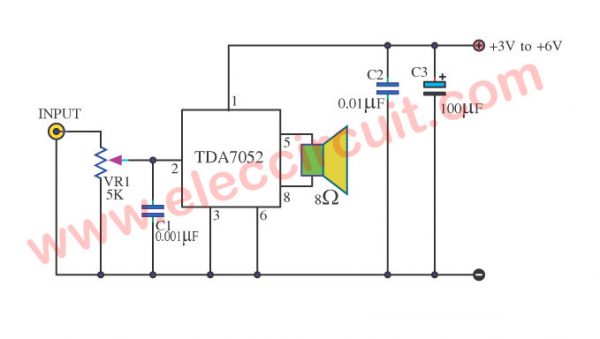
TDA7052 amplifier | Low voltage 3V, 5V | 1 W


lm4871 hxj8002
https://www.youtube.com/watch?v=tVHfRD_mhWc