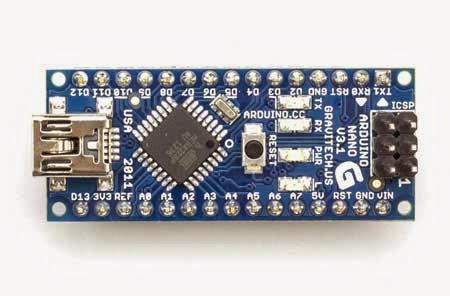
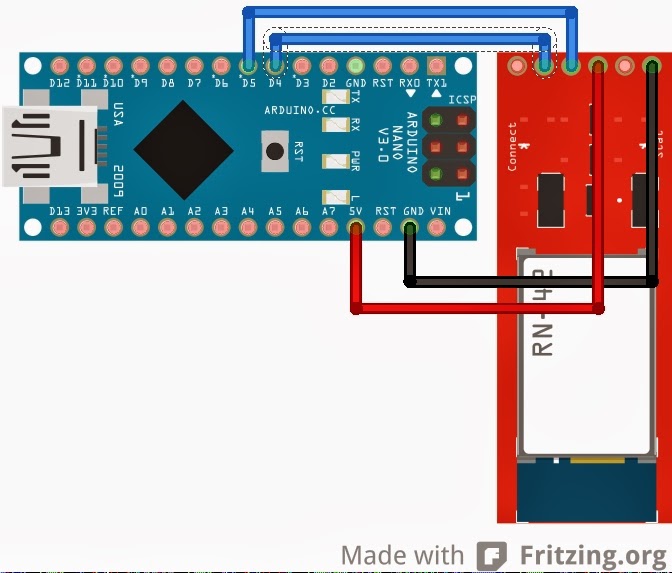
The version described below is 0.1.
Next version is 1.0 (ATmega8 5V 8MHz)
Delco Suite (Daewoo Research, SensDiag, OpenDiagFree):
22:22:56.87  Write F4 57 01 00 B4
22:22:56.89  Read  F4 57 01 00 B4
22:22:56.97  Read  F4 92 01 07 41 00 00 00 80 81 61 F5 F7 FE 19 00 69 00 00 D8 3F 81 79 80 00 09 5A 5A 00 29 19 3B 23 00 00 00 00 20 00 04 2A 5B 80 00 00 CE 00 00 00 00 80 00 08 00 01 01 00 20 06 00 00 E4 98 52
ref: http://lanos.com.ua/forum/topic/58135-programma-dlya-raboty-s-ebu-gm-iefi6/page-40
echo -en '\xF4\x57\x01\x00\xB4\xF4\x92\x01\x07\x41\x00\x00\x00\x80\x81\x61\xF5\xF7\xFE\x19\x00\x69\x00\x00\xD8\x3F\x81\x79\x80\x00\x09\x5A\x5A\x00\x29\x19\x3B\x23\x00\x00\x00\x00\x20\x00\x04\x2A\x5B\x80\x00\x00\xCE\x00\x00\x00\x00\x80\x00\x08\x00\x01\x01\x00\x20\x06\x00\x00\xE4\x98\x52' >/dev/ttyUSB1
stty -F /dev/ttyUSB0 speed 9600 cs8 -cstopb -parenb -icanon min 1 time 1
while read -rs -n 1 c; do echo $c | od -x; done < /dev/ttyUSB0
0000000 abf4 f480 000a
0000005
0000000 0aab
0000002
0000000 0a80
0000002
http://pcmhacking.net/forums/viewtopic.php?f=31&t=592
pl2303 custom baud
https://www.drive2.ru/l/3297671/
HobDrive?
http://vagcom.com.ua/programmy-dlya-lanos-sens-daewoo-chevrolet/
>244,86,1,181,
F4 56 01 B5
244 86 1 181
stty -F /dev/ttyUSB0 speed 9600 cs8 -cstopb -parenb -icanon min 1 time 1
while read -rs -n 1 c; do echo $c | xxd -p; done < /dev/ttyUSB0
echo -en 'A' > /dev/ttyUSB1
echo -en '\x41' > /dev/ttyUSB1
while true; do cat -v < /dev/ttyUSB0; done
while true; do read -n 1 LINE < /dev/ttyUSB0; echo $LINE | xxd -p; done
while read -rs -n 1 c; do echo $c | od -x; done < /dev/ttyUSB0
f4ab010a
b50a
7d0a
550a
http://www.oocities.org/ecmguy.geo/diagnostics/baud8192.html
The 8192 GM data format is asynchronous serial data the same as your PC is capable of processing, The 8192 baud rate is non-standard, but you can set the PC to a close enough so that the PC will accommodate the error.
GM started using the 8192 baud OBD-I interface in 1986 and continued using it widely until 1995 when a universal interface and protocol was mandated by SAE (OBD-II). The OBD-I interface on GM cars is a proprietary GM interface.
8192 (10400?)
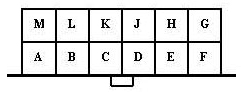
M - K-Line
A - GND
H,G - +12V
Soft&Manuals http://slavuta-club.info/forum/index.php?topic=11181
http://open.e-voron.dp.ua/usb_k_l_line_adapter/
типовые параметры Ланос 1.5 на холостом ходу:
1 Идентификация калибровки 1857
2 Температура охлаждающей жидкости 95 °С
3 Температура воздуха 16 °С
4 Давление во впускном коллекторе 34,7 КПа
5 Атмосферное давление 99,9 КПа
6 Разрежение во впускном коллекторе 64,9 КПа
7 Напр. датч. полож. дроссельной заслонки 0,54 В
8 Частота вращения коленвала 825 об/мин
9 Выходное напряжение датчика кислорода 807 мВ
10 Скорость автомобиля 0 км/час
11 Выходное напряжение датчика кислорода 0 мВ
12 Давление кондиционера -128 КПа
13 Темп. наддува 59 °С
14 Напряжение бортсети (питания ЭБУ) 14,2 В
15 Регулировка CO (с разомкн. петлей) 128
16 Угол опережения зажигания 3,9 °пкв
17 Желаемое положение РДВ 25 шаг
18 Фактическое положение РДВ 25 шаг
19 Желаемая частота вращ. коленвала 831 об/мин
20 Длительность импульса впрыска 1,21 мс
21 Соотношение воздух/топливо 14,6
22 Обучение блока 120
23 Номер яч. памяти BLM, регулирующей подачу топлива 0
24 Переменная интегратора замкнутой петли топл. 128
25 Coolant temp. switch да
26 Высокая скорость вентилятора нет
27 Соленоид кондиционера нет
28 Низкая скорость вентилятора да
29 Выключатель кондиционера нет
30 Топливный насос да
31 Отсечка топлива нет
32 Флаг полевого обслуживания нет
33 Система впуска переменной геометрии нет
34 Соленоид продувки вкл. нет
35 Дроссель закрыт да
36 Отсечка топлива при торможении нет
37 Обр. связь по кислороду (1-замкнута, 0-разомкнута) да
38 Обучение разрешено да
39 Богатая/бедная смесь (1-богатая, 0-бедная) нет
40 Перегрев дожигателя нет
41 Холостой ход да
42 Низкие обороты да
43 Сброс перем. интегратора петли топл. нет
44 Запрос сброса РХХ нет
45 Сброс РХХ нет
46 Датчик O2 готов к работе да
47 Нейтральная передача нет
48 Кондиционер нет
49 Двигатель регулятора холостого хода нет
50 Запрос кондиционера от водителя нет
51 Запрос включения вентилятора нет
52 Октановое число 95
еще https://yadi.sk/i/dF17ZJO5jMcUd
Check It 3.0 :